


Mileage Tracker & Vehicle Log
4.2369.00 Reviews
App Specs
- Version
- 4.2.5
- Updated On
- License
- Free
- Downloads
- 500,000+
- Developer
- autolog.app
- Categories
- Auto & Vehicles
- Platform
- Android, iOS
Screenshots
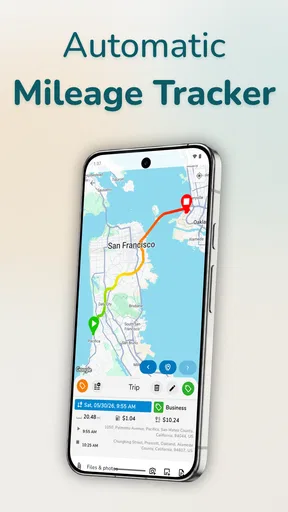
 Analysis by AppCompare
When several people share a car, the mileage record can become everyone’s responsibility and no one’s reliable habit. I like the idea of keeping trips and vehicle costs in one place, but a household needs to agree on who records what before a log becomes useful. Mileage Tracker & Vehicle Log is aimed at mileage tracking, and its vehicle-log approach may help a family, couple, or small team keep better records without relying on a glove-box notebook.
A shared car needs a clear routine
Picture a household where one person drives to work, another takes the car for errands, and a third uses it for a business appointment. At the end of the week, trying to reconstruct which journeys were work-related from memory is exactly the kind of task that gets postponed. A mileage log can make that distinction easier to maintain, provided the people using the car agree on a simple routine: record the trip close to when it happens, and identify its purpose consistently.
I would treat the app as a record-keeping tool, not as a substitute for household communication. If one driver assumes every trip is being captured automatically while another expects to enter trips manually, gaps can creep in. Before relying on the log for reimbursement or tax records, I’d decide who checks the entries and when. That small agreement matters more than creating an elaborate process nobody will stick to.
Keep personal and business records distinct
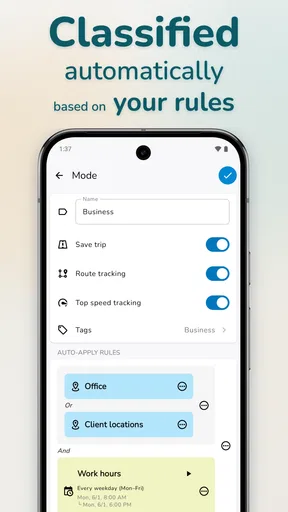
The app’s business-versus-personal trip categorization is particularly relevant when a vehicle serves both home and work. I would make the category decision part of the trip-recording habit instead of leaving a pile of uncategorized journeys to sort out later. A short note about why a drive was business-related can also help jog your memory when reviewing records, if the app’s entry options suit that workflow.
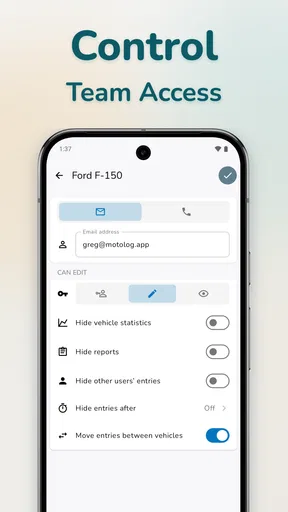
There is a practical boundary here: shared access to a device or vehicle does not automatically mean every driver should use the same account or handle the same records. If the household’s trips have different owners, reimbursement arrangements, or work purposes, decide whose records are being maintained before mixing entries. That is especially important when one person needs a report for work and another only wants a personal history of vehicle costs.
Coordination without turning logging into a chore
For a shared car, I would keep the process deliberately lightweight. The person who makes a trip can check the log at a regular point in their day, while whoever manages household vehicle expenses can review fuel and maintenance entries on a separate schedule. This avoids asking every driver to become the family’s full-time record keeper, and it makes missing information easier to catch while the journey is still fresh in someone’s mind.
Automatic tracking can reduce the effort of remembering to record each drive, but it does not remove the need to review what has been captured. Short stops, a change of driver, or a journey with both personal and business purposes are the sorts of situations where I would check the resulting record rather than assume it is ready to submit. A quick review is a useful trade-off: less routine typing, but still a human decision about whether the entry is complete and categorized correctly.
Worth Reading Before You Choose

EA SPORTS FC Mobile 26 Is a Bigger Football Game, but It Takes Time

Flipboard Shows What News Apps Must Do Beyond the Feed

Switching to Android Auto Means Rethinking Your Driving Routine

Google Calendar Makes a Crowded Week Easier to Manage

Ludo King Makes the Most of the Minutes Between Plans

Baby Panda World Brings Quick Play to Modern Phones, but Its Game Library Feels Busy
Trust, age, and practical expectations
The app is rated for Everyone, which makes its age context broad, but I would still keep financial and work records under an adult’s supervision when younger household members share a vehicle or device. Mileage and expense logs can reveal routines, destinations, and costs, so it is sensible to be thoughtful about who can see the records and who is responsible for maintaining them. I would not use a mileage log as a way to monitor another driver without their knowledge.
For the same reason, think through the account boundary before several people start entering information. A single shared log may be convenient for one household vehicle, while separate records may be clearer when different drivers need their own business documentation. The right choice depends on how you use the car; the app does not make that decision for you.
Who is likely to get the most from it?
I see the strongest fit for someone who drives regularly for work, needs a mileage record for reimbursement or tax preparation, and is willing to review entries rather than treating automation as infallible. It can also suit a household that wants a single place for trip categories and vehicle expenses. Someone who drives only occasionally, never needs to separate business journeys, and already keeps reliable records may find a dedicated mileage app unnecessary.
If your priority is simply remembering when the car needs routine attention, a calendar reminder or a basic maintenance notebook may be less effort. If your main concern is calculating business mileage, a general spreadsheet can be flexible, but it depends on you to enter dates, distances, and categories consistently. This app’s appeal is the combination of mileage tracking and vehicle logging; that combination is useful when you will actually maintain both sides of the record, not just install it and expect it to organize years of information by itself.
What I would check before depending on the records
Before using any mileage app for paperwork, I would run it alongside my existing method for a short period and compare a few ordinary trips. That gives you a chance to see whether the logging routine fits your commute, errands, and business drives, and to notice whether you need to correct or categorize entries. Keep the source records your employer or tax process requires, and make sure any exported report matches the format you need before a deadline is close.
Also consider the phone’s role in the process. Automatic location-based tracking is convenient, but it can be a poor fit if you do not want a phone involved in recording journeys, or if drivers regularly switch between devices. In those cases, manual notes or a shared spreadsheet may be more transparent. For a person who drives the same vehicle consistently and is comfortable checking the app, automation can save effort; for a rotating group of drivers, a clear handoff matters more than the tracking method.
There is also a cost decision beyond the initial download. The app is free to install, while in-app purchases range from under a dollar to nearly four hundred dollars per item. I would check what is included in the free experience and what a particular paid option unlocks before committing, especially if you only need basic trip records. Its age rating is Everyone, and the developer is autolog.app; the current release is version 4.1.10, with Android 8.0 as the minimum operating system requirement.
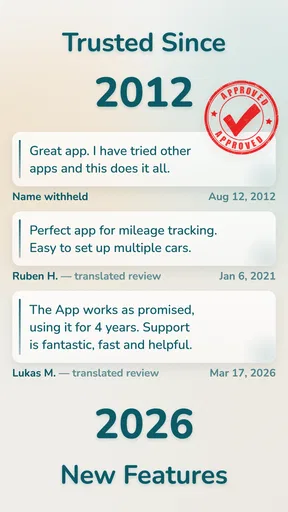
It has an average rating of 4.2 from around 8,100 ratings, and more than 500,000 installs, which suggests it has found an audience among drivers looking for this kind of tool. I would still judge it by your own routine: a rating cannot tell you whether the way you share a car or file expenses matches how you want to keep records.
If you try it, start with one vehicle and a small, consistent set of categories rather than trying to reconstruct every old trip at once. Review the first reports before using them for reimbursement or tax work, and agree with other drivers on who records shared journeys. That practical approach gives you a fair test without turning mileage tracking into another household project.
What Makes Mileage Tracker & Vehicle Log Stand Out?
First off, let’s talk about why this app caught my eye in the first place. With so many mileage apps out there, it can be hard to find one that doesn’t overcomplicate things. The Mileage Tracker & Vehicle Log app is all about simplicity and accuracy. It offers an intuitive interface that even a tech newbie could navigate without a hitch.
Easy Setup and Integration
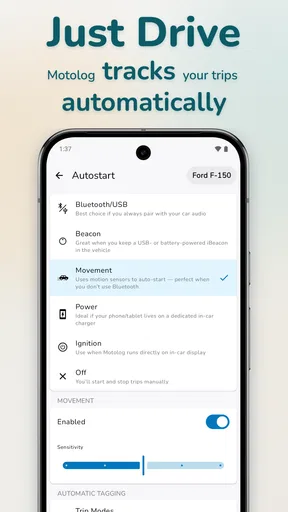
The setup process is incredibly straightforward. Once you download the app, you can immediately start logging your trips. What’s even cooler is that the app integrates seamlessly with GPS, making the tracking process almost entirely automatic. No more jotting down miles every time you make a trip — it’s all done for you! This integration ensures that your mileage is logged accurately, saving you from the hassle of manual entry.
Efficient Expense Management
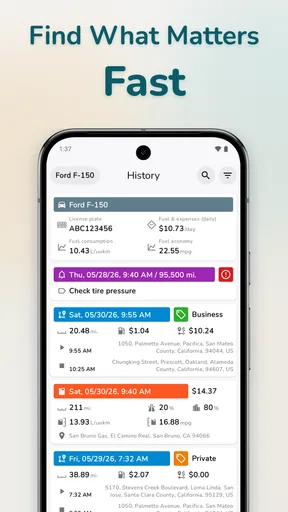
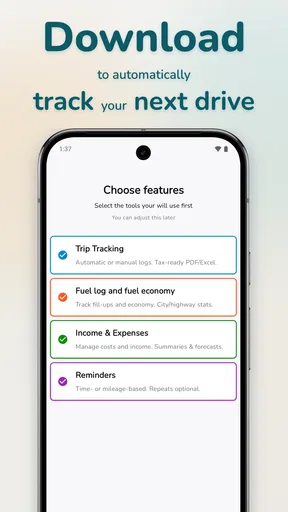
On top of its tracking capabilities, the app also doubles as a comprehensive vehicle log. This feature is a lifesaver for those of us managing multiple vehicles or needing detailed expense reports. You can easily input fuel costs, maintenance expenses, and even set reminders for upcoming services. This way, you always know when it’s time for that oil change or tire rotation, keeping your vehicle in top shape.
Customization and User-Friendly Features
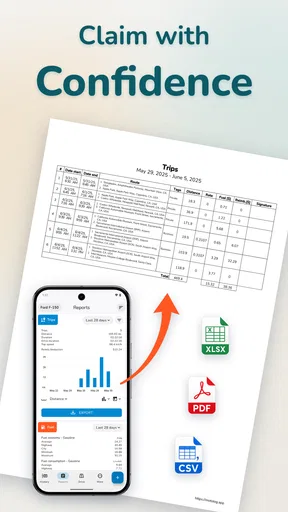
One of the best parts about using this app is the level of customization it offers. You can categorize trips by personal or business use, which is super handy come tax time. Plus, the app allows you to generate detailed reports that can be exported in various formats like CSV or PDF. This makes it easy to share with your accountant or keep records for your own peace of mind.
Secure and Reliable
Security is another critical factor, especially when it comes to apps that handle financial data. I was pleased to find that Mileage Tracker & Vehicle Log takes data protection seriously. All your information is securely stored, and you have the option to back up your data to the cloud, ensuring you never lose your logs.
My Personal Takeaway
After using the app for a few weeks, I’ve got to say, I’m impressed. Not only has it saved me time, but it’s also helped me stay organized with minimal effort. Whether you’re a freelancer, small business owner, or just someone who likes to keep their vehicle expenses in check, this app is worth a try. The convenience and efficiency it offers make it a must-have tool for anyone looking to simplify their mileage tracking process.
In conclusion, if you’re in the market for a reliable and user-friendly mileage tracking app, give Mileage Tracker & Vehicle Log a shot. It’s got all the features you need without the unnecessary fluff, making it a practical addition to your digital toolkit. Happy tracking!
Pros
- Automatic trip detection saves time.
- Intuitive interface for ease of use.
- Comprehensive reporting tools available.
- Syncs data across multiple devices.
- Supports multiple vehicle tracking.
Cons
- Limited features in free version.
- Occasional GPS inaccuracies.
- No offline mode available.
- Ads can be intrusive at times.
- Requires frequent app updates.
FAQs for Mileage Tracker & Vehicle Log
What is Mileage Tracker & Vehicle Log used for?
Mileage Tracker & Vehicle Log is designed to help users efficiently track their vehicle mileage and log details for business or personal use. This app automates mileage tracking using GPS, ensuring accurate records for tax deductions, reimbursements, or personal analysis. It simplifies organizing and exporting data to meet user-specific needs.
How does the app track mileage automatically?
The app uses your device's GPS to monitor your vehicle's movements. Once a trip starts, the app automatically logs the distance traveled, providing an accurate and hands-free way to track mileage. Users can set preferences for automatic tracking and customize trip categorization for business or personal use.
Is it possible to export mileage logs for tax purposes?
Yes, the app offers easy export options for mileage logs. Users can generate reports in various formats, such as PDF or CSV, making it simple to share with accountants or integrate with tax preparation software. This feature is particularly beneficial for those needing detailed records for tax deductions or reimbursements.
Does the app support multiple vehicles?
Absolutely. Mileage Tracker & Vehicle Log supports multiple vehicles, allowing users to switch between different vehicles seamlessly. Each vehicle can have its own set of logs and reports, helping users manage fleet operations or personal vehicles without any confusion or mix-up of data.
Is my data secure while using Mileage Tracker & Vehicle Log?
The app prioritizes user data security by implementing encryption and regularly updating its security protocols. Users can rest assured that their sensitive information, such as trip details and personal data, is well-protected. Additionally, options for data backup and cloud storage ensure data integrity and accessibility.


